Windows 7 with its commendable performance improvements may be on the horizon. But for now, most of us have to live with Windows Vista, which can make even the fastest computer seem slow.
But you don't have to put up with Vista's sluggishness without a fight. In fact, most of what ails Vista when it comes to performance can be remedied by adjusting some settings and eliminating some features.
And the good news: The whole process need not take more than half an hour. Afterwards, you'll be rewarded a computer that feels a lot faster.
Vista went overboard with window animation -- the almost slow -- motion visual effect that occurs when you minimise or maximise an application. Whether you think the animation is cool or not, it's indisputable that it slows you down -- or at least it seems to.
Turn off window animation
Luckily, turning off window animation is possible, and doing so will not affect other types of interface animation that you may enjoy in Vista. Open the Windows Control Panel, click System and Maintenance, Performance Information and Tools, Advanced Tools from the task pane at the left, and then click "Adjust the appearance and performance of Windows". A user account control dialog box will prompt you, and you should click Continue. The Performance Options dialog box will open.
On the Visual Effects tab of the Performance Options dialog box, you have four choices: "Let Windows choose what's best for my computer", "Adjust for best appearance", "Adjust for best performance", and "Custom". "Custom" is followed by a list of individual check boxes that allow you to determine exactly which visual effects you would like to turn on or off.
To start, click "Custom", and then remove the check mark next to the "Animate windows when minimising and maximising". De-activating that option will make your applications and other windows snap into and out of view immediately rather than gradually. Changing this setting alone may be enough to make Vista feel snappier for you, and you could stop there and see how you like the change.
Go to 'Adjust for best performance'
If you're working on an underpowered or a really old machine and want to configure Vista's interface so that it uses a minimum of system resources, simply select the "Adjust for best performance" option. Doing so will remove virtually all of Vista's interface enhancements, but it will reduce the load on your computer.
If you want to get rid of all of Vista's fancy - but resource zapping - visual niceties, you can revisit the Performance Options dialog box and turn off a few more of the effects.
Turn off UAC (User account control)
User account control (UAC) is supposed to keep you safe from malicious software. But the penalty is that at every turn, you're prompted to provide Windows permission to carry out some action -- from deleting files to installing applications -- that you specifically requested.
It's an annoyance. You probably lived fine without UAC for many years. Plus you also likely run antivirus or anti-spyware software that keeps a lookout for possible harm. Then why not just turn UAC off?
It's easy enough to do. Open the Control Panel, and click User Accounts and Family Safety. Then click User Accounts. From the resulting User Accounts screen, click "Turn User Account Control on or off". On the next screen, remove the check mark from the box labelled "Use User Account Control (UAC) to help protect your computer". Click OK. You'll have to restart your computer, but once you do, those annoying UAC prompts will be gone.
Optimise indexing feature
Whether you like Vista's new indexing feature or not, you can optimise the way it works or disable it altogether. Open the Vista Control Panel, and click System and Maintenance, followed by Indexing
In the resulting Indexing Options dialog box, you can control which drives and folders get indexed by clicking the Modify button. Click Advanced to specify which file types are indexed.
Limiting the drives, folders, and file types that are indexed will reduce the amount of time that Vista spends indexing, and it will therefore reduce the overhead required by the indexing feature and consequently speed up your computer.
Making the few interface and operational tweaks here typically allows Vista to perform on a par with Windows XP. And for now, while the world waits for the even snappier Windows 7, that's probably good enough.
Wednesday, July 29, 2009


Wednesday, April 29, 2009
Office 2010 screenshots.

Office 2010, the next version of Microsoft's successful office programs suite, has been in closed testing for a while now. With a public beta expected later in the year, development is stepping up before the program, previously dubbed Office 14, is finally let out into the wild.
Here are some images of the new about screen of Office and screenshots of the new version of Outlook, including the ribbon toolbar. Click the images to enlarge where they are scaled down.


Gmail Redesigned 3.0 Focuses on Speed and Message Space

Gmail Redesigned, the dark-skinned theme that's part of the popular Google Redesigned Extension, has been released in a 3.0 version that adds more message space, reduces in size by half, and supports newer Gmail features.
Gmail Redesigned 3.0 isn't a major, uh, redesign of the all-encompassing skin, but it does try to address issues and irks that users have emailed and posted to Globex Designs. Chief among them is reducing the amount of vertical space taken up at the top by the logos, out-links, and other elements. There's also support for the newer pages orbiting Gmail, like the stand-alone Google Contacts, and full support for the "Older" (/faster) Gmail version. In addition, the design team states that they reduced the size of the pre-loading elements by around 50 percent, hopefully speeding up load times for users. Web designers, take note:
How are we able to make sure drastic reductions in size while adding so many new features? The biggest factor was the unification of many of the interface elements and further improvements of our compression algorithms. If you're interested in finding out more about our CSS compression, keep an eye out on our website as we will be releasing a brand new product called - CSS Compressor.
Enough code talk—let's take a look. The top picture on this post is the basic inbox view; here's how things look in a Compose window:

And look to the right for a compilation of sidebar widgets and a chat window with Gmail Redesigned 3.0.
 Gmail Redesigned 3.0 will automatically update itself if you're using the Google Redesigned extension. Hit the link for details on the download, as well as the individual Gmail, Google Calendar, and Google Reader styles.
Windows Vista SP2 released to manufacturing

Microsoft has announced that SP2 for Vista has been released to manufacturing (RTM), which includes all the rolling updates and support for 'emerging hardware standards.'
Microsoft is keen to push people away from the concept of service packs as major upgrades, but people still remember the Windows XP SP which virtually rewrote half of the Operating System to make it more secure for internet use.
The rolling security updates and patches are now Microsoft's preferred method of updating PCs, but for manufacturers and IT staff it is important to have a complete package to put on computers.
Support for new standards
SP2 brings the likes of Windows Search 4.0, Bluetooth 2.1 support, Windows Connect Now functionality and the ability to record data onto Blu-ray media natively.
Microsoft is keen to push people away from the concept of service packs as major upgrades, but people still remember the Windows XP SP which virtually rewrote half of the Operating System to make it more secure for internet use.
The rolling security updates and patches are now Microsoft's preferred method of updating PCs, but for manufacturers and IT staff it is important to have a complete package to put on computers.
Support for new standards
SP2 brings the likes of Windows Search 4.0, Bluetooth 2.1 support, Windows Connect Now functionality and the ability to record data onto Blu-ray media natively.
"Today we are announcing the Release to Manufacturing (RTM) of Service Pack 2 (SP2) for Windows Vista and Windows Server 2008. SP2 represents the latest step in Microsoft's commitment to continuous improvement, said Brandon LeBlanc in a blog post.
"It includes all updates that have been delivered since SP1, as well as support for new types of hardware and emerging hardware standards."
The public availability of SP2 is still pegged to Q2, the second quarter of the year.
Tuesday, April 28, 2009
Axxana Phoenix Is a Ruggedised SSD Array for Hardcore Data Backup

Because I'm paranoid about backing up files in multiple places, Axxana's Phoenix System, which features a multiple SSD array, looks pretty great. Especially considering it can withstand earthquakes, fire, water and "terror."
The storage capacity of the Phoenix System ranges between 72 and 300-gigabyte capacities. It can withstand 2000 degrees Fahrenheit for an hour, or 482 degrees for 6 hours. It would also survive under 40 G of shock, 30 feet of water pressure or 5000 pounds of force. On top of that, it has 3G and wi-fi antennas which allow you to access it's data if you cant connect directly, and batteries which support 6 hours of 3G transfer if power should be cut.
But Axxana Phoenix System isn't necessarily for the home—it stands 3 feet tall, is 2 feet wide and is 4 feet deep. Plus it weighs 436 pounds. Mentions of price are nowhere to be seen, but I'll leave that up to your imagination to figure out.
The storage capacity of the Phoenix System ranges between 72 and 300-gigabyte capacities. It can withstand 2000 degrees Fahrenheit for an hour, or 482 degrees for 6 hours. It would also survive under 40 G of shock, 30 feet of water pressure or 5000 pounds of force. On top of that, it has 3G and wi-fi antennas which allow you to access it's data if you cant connect directly, and batteries which support 6 hours of 3G transfer if power should be cut.
But Axxana Phoenix System isn't necessarily for the home—it stands 3 feet tall, is 2 feet wide and is 4 feet deep. Plus it weighs 436 pounds. Mentions of price are nowhere to be seen, but I'll leave that up to your imagination to figure out.
Monday, April 27, 2009
Oracle buys Sun for $7 billion
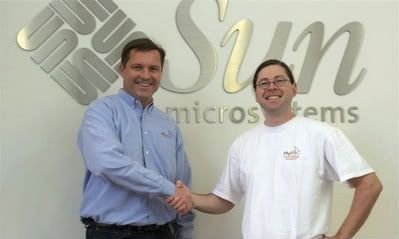 On April 20, 2009, Oracle announced it has entered into an agreement to acquire Sun Microsystems (Sun). The proposed transaction is subject to Sun stockholder approval, certain regulatory approvals and customary closing conditions. Until the deal closes, each company will continue to operate independently, and it is business as usual.
The acquisition combines best-in-class enterprise software and mission-critical computing systems. Oracle plans to engineer and deliver an integrated system—applications to disk—where all the pieces fit and work together so customers do not have to do it themselves. Customers benefit as their system integration costs go down while system performance, reliability and security go up.
Oracle will pay $9.50 a share for Sun, which values the high-end server and software maker at about $7.06 billion, based on 743 million shares outstanding as of the end of its second fiscal quarter on December 28, according to Sun. Sun had previously rejected IBM’s offer to pay up to $9.40 a share, according to sources with knowledge of the matter. Shares of Sun jumped 35.7 percent to $9.08 in morning Nasdaq trading, while Oracle shares fell 3.7 percent to $18.36. Shares of IBM, which did not immediately return calls for comment, fell 1.8 percent to $99.49 on the NYSE. Oracle President Safra Catz said on a conference call that Oracle intends to make the hardware division profitable. Sun’s top-selling products are high-end servers and storage equipment.
New Professional 3D Production System Comes From Panasonic
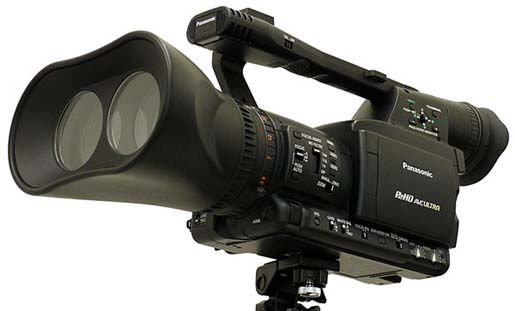 One of the biggest High Definition Technology companies Panasonic Corporation has announced a professional 3D Full HD Production system. This device claims the first in the industry, consists of a twin-lens P2 professional camera recorder and a 3D Compatible High definition display.Panasonic has decided to exhibit the concept of 3D system at its booth on NAB 2009, which is going to be held in Las Vegas today. This interesting 3D camera from Panasonic based on the actual and suiting P2 HPX170.
Subscribe to:
Posts (Atom)
